Most store owners already track their competitors. They do it the way most of us check the weather. They glance at a rival’s homepage when they remember, notice a sale a week late and hear about a price cut from a customer.
That isn’t a system, and it means finding out late. A routine that takes half an hour a week turns it into something you can act on.
Tracking competitors means looking at the same things on the same rival stores on a schedule, and writing down what changed. For an online store that’s their offers, their prices, what’s new or sold out, their place in Google and their ads. Done weekly, it shows you a rival’s habits as well as its moves.
Step 1: Choose who to track
Track three to six stores, the ones your shoppers really choose between, not every store in your category.
The quickest way to find them is to search Google for the three or four things you sell most, the way a shopper would type them, in the country you sell to. The stores that keep turning up next to you are your competitors in search, whoever you think your competitors are. Add the one or two your customers mention by name.
Ecommerce competitor analysis walks through choosing them in more detail, with a template.
Step 2: Decide what to watch
These are the things that move often enough to matter and that you can act on.
| What | Where to look | How often | Why it matters |
|---|---|---|---|
| Offers and sales | The top of their homepage, the top bar, any sale page | Weekly, daily in busy seasons | Many price cuts never touch the product page. They live in a banner or a code |
| Prices of the products you both sell | The product pages | Weekly, daily for your most compared products | A rival’s sale on your bestseller costs you orders while it runs |
| New products and sell-outs | Their new arrivals page and the products you compete on | Weekly | A sell-out on something you also sell sends shoppers your way |
| Shipping and returns | The top bar, the shipping page | Monthly | A lower free-shipping minimum can beat a lower price |
| Google rankings | Search your main searches in a private window | Weekly | Who shows up first gets most of the clicks |
| Ads | Meta’s Ad Library and Google’s Ads Transparency Center | Monthly | Shows what they’re pushing and which message they’re testing |
| Their emails | Sign up to their newsletter with a work address | As they arrive | Sales often reach subscribers before the site |
You don’t need all of it. If you sell on price, start with offers and prices. If you sell on brand, start with new products and ads.
Step 3: The 30-minute Monday routine
Do it on the same day each week and keep your notes in one place. The order matters less than doing it every week.
- Homepages first (10 minutes). Open each rival’s homepage and read the banner and the top bar. Note any sale, its depth, its code and its end date if it shows one.
- Your shared products (10 minutes). Check the price and stock of the five to ten rival products a shopper weighs against yours. Note anything that moved since last week.
- Search (5 minutes). In a private window, search your three main searches. Note who’s above you and whether that changed.
- Their inbox (5 minutes). Skim the emails they sent you that week. Note offers you didn’t see on the site.
- Write the week down. One line per change: the date, the rival, what changed and a link to the page. Then one line on what you’ll do about it, if anything.
Once a month, add ten minutes for their ads in Meta’s Ad Library and Google’s Ads Transparency Center, and for their shipping and returns pages.
Step 4: Turn the notes into decisions
After four weeks of notes, patterns show up that a single visit never shows.
A rival that runs a sale every month isn’t cutting prices. The sale price is its real price, and you should compare yourself with that.
A rival that cuts the products you both sell, and only those, is competing with you directly. Decide where you want to stand on those products. Competitor-based pricing has the three positions and a worked example.
A rival that sells out of something often has a stock problem you can use. Make sure your version is easy to find when it happens.
A rival climbing in Google for your searches is doing something on its site. Look at the pages that rank and what changed on them.
Most weeks, the right decision is to do nothing. The notes are still worth keeping, because the week you need them you’ll have the history.
See your competitors this week
Type your address. We find the sites that turn up next to yours in Google, in your country and language, and read them every week.
3 days free, then from $49 a month. Cancel any time.
Where tracking by hand breaks
The routine works for three rivals and ten products. It starts to slip at around six rivals or thirty products, for three reasons.
- Busy weeks. The week you skip is the week a rival ran its biggest sale. You can’t go back and read last Tuesday’s homepage.
- Things you don’t look at. You check the products you know about. A rival’s new range, or a sale on a page you never open, goes past you.
- No history. A spreadsheet holds what you typed. It doesn’t hold the page you read it on, so a month later you can’t check it.
That’s the point where software is cheaper than your time. Competitor monitoring tools compares twelve of them, from free page watchers to repricing tools.
How Over the Fence does it
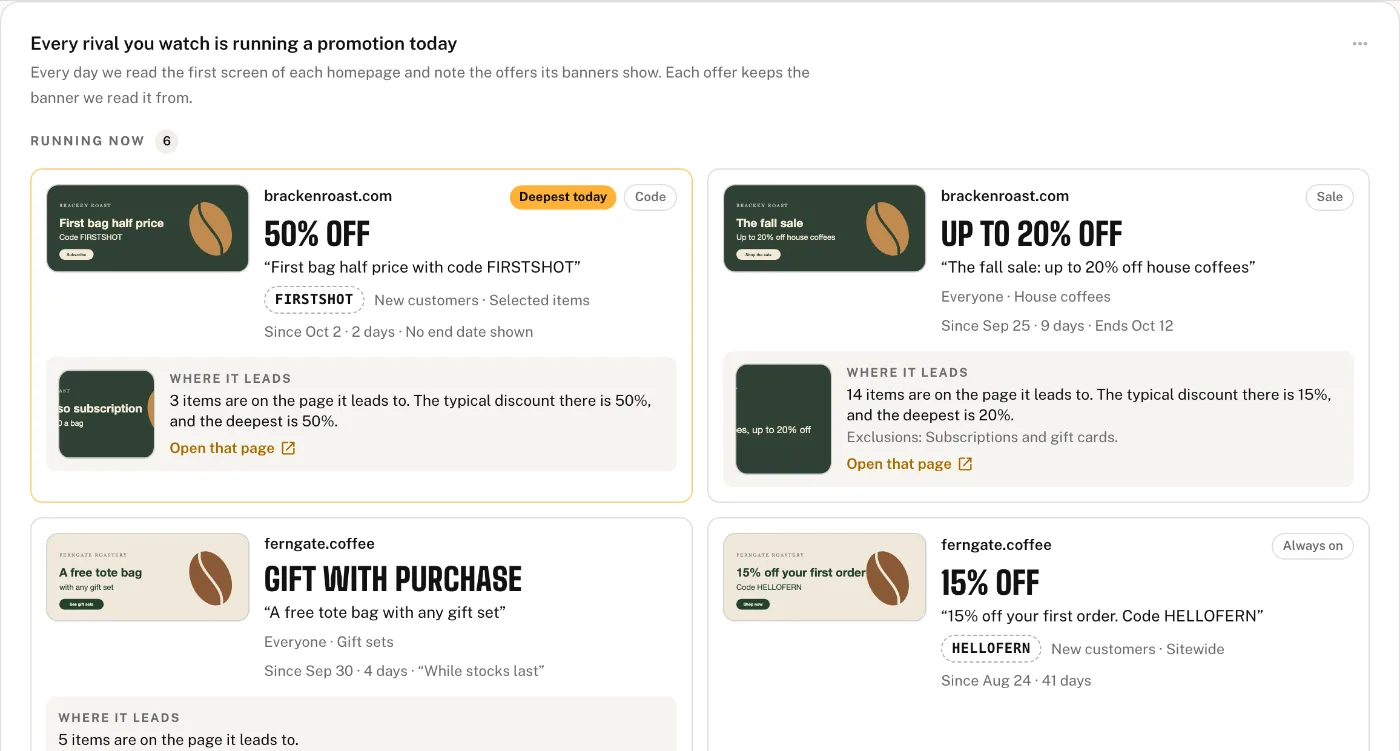
Over the Fence runs this routine for you. Every day it reads the top of each rival’s homepage and offers pages, banners included, and the prices and stock of a short list of their products (10, 25 or 50 a site, by plan). Every week it reads their whole sites for new, changed and gone pages, and checks where you and they rank in Google for your searches. Each finding links to the page it came from.
Once a week you get one email with three findings at most, each with what to do first. We don’t track rivals’ ads, so keep the monthly look at the ad libraries. Plans start at $49 a month, with 3 days free.